




The decentralized finance industry is constantly evolving, and to seamlessly navigate it, you need a reliable cryptocurrency wallet — a key security tool. For the past few years, MetaMask has dominated this space. However, it has been replaced by a new generation of crypto wallets, specifically designed for users who need access to a wide variety of blockchains. In this review, we'll explore how Rabby Wallet is better than MetaMask and how to create one.

Content:
- What is Rabbit Wallet and why is it better than MetaMask?
- Advantages and key features of Rabby Wallet
- Installing Rabby Wallet and creating a wallet
- Setting up a wallet
- How to check the list of websites and DApps connected to Rabbit Wallet
- How to top up Rabbit Wallet
- Cryptocurrency exchange in Rabby Wallet
- Paying for Gas with Stablecoins: How Gas Account Works
- Bridges in Rabbit Wallet
- How to withdraw funds from Rabbit Wallet
- Frequently Asked Questions (FAQ)
What is Rabbit Wallet and Why is it Better Than MetaMask?
Rabby Wallet is a modern, decentralized, open-source, non-custodial cryptocurrency wallet from the DeBank team, creators of the popular crypto portfolio tracking platform. The wallet was created specifically for active users of DeFi — bank- and intermediary-free financial services powered by blockchain and supporting over 100 Ethereum-compatible networks.
The main difference between Rabby Wallet and MetaMask is its greater convenience and increased security in a multi-network environment.
|
Characteristic |
Rabbit Wallet |
MetaMask |
|
Switching networks |
Automatic: The wallet automatically detects which network the dApp requires and instantly switches to it. |
Manual: The user adds and switches networks themselves (for example, from Ethereum to Polygon). |
|
View transactions (security) |
Advanced mode: shows the expected balance change before signing a transaction and performs risk checking, such as warning about suspicious permissions. |
Basic mode: Provides limited information about the transaction, making it difficult to verify risks. |
|
Blockchain support |
Supports over 100 EVM networks with auto-discovery. |
Most EVM networks (except the main ones) require manual addition. |
|
Asset Management |
Automatic token and NFT discovery thanks to integration with DeBank. A single address book consolidates all addresses. |
Most user tokens require manual addition, and separate address books are created for each account. |
|
Gas refill |
The built-in Gas Top Up feature allows you to top up tokens to pay gas fees using other assets. |
Typically, a native network token is required. |
|
Purpose |
Designed for active DeFi users across multiple networks. |
It was originally created as a universal wallet for Web3. |
Advantages and Key Features of Rabby Wallet
At the time of writing, Rabby Wallet was the only wallet on the market that combined three key features: automatic network switching, the ability to pay fees with stablecoins on different blockchains, and enhanced security. Each of these features addresses issues common to other cryptocurrency wallets.
Support for Multiple Blockchains
Experienced users have likely encountered the problem of manually switching networks. For example, if you're using the Uniswap exchange on the Ethereum network and want to switch to the Aave protocol to apply for a loan, MetaMask will require you to manually switch to the Polygon network. This can be a mistake, not to mention the inconvenience of the operation itself.
Rabby Wallet completely eliminates this problem: the wallet automatically detects the correct blockchain for each dApp and instantly switches to it in the background, seamlessly. This allows you to quickly and securely interact with over 100 Ethereum-compatible networks without the risk of signing a transaction on the wrong network.
High Level of Security
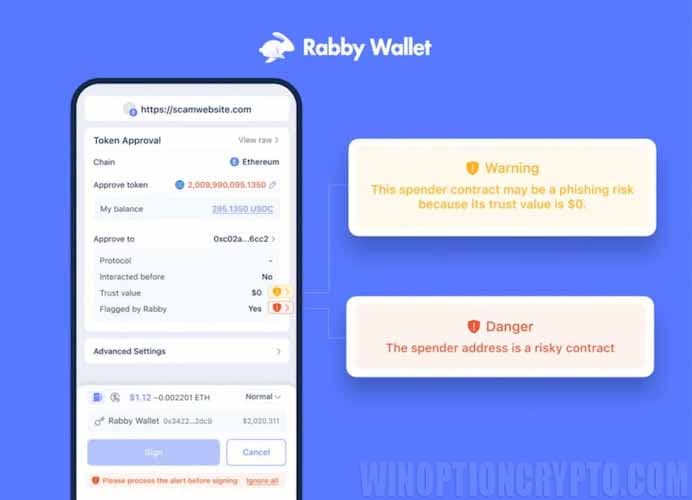
Rabby Wallet takes security to a new level – it protects users even before a transaction is signed. With its Transaction Pre-Confirmation feature, Rabby simulates the transaction and displays in advance how your balance will change after it's processed. Additionally, the wallet promptly warns you of potential threats, including suspicious addresses and contracts, requests for endless token approval, phishing attempts, and other risks.
User-friendly Interface
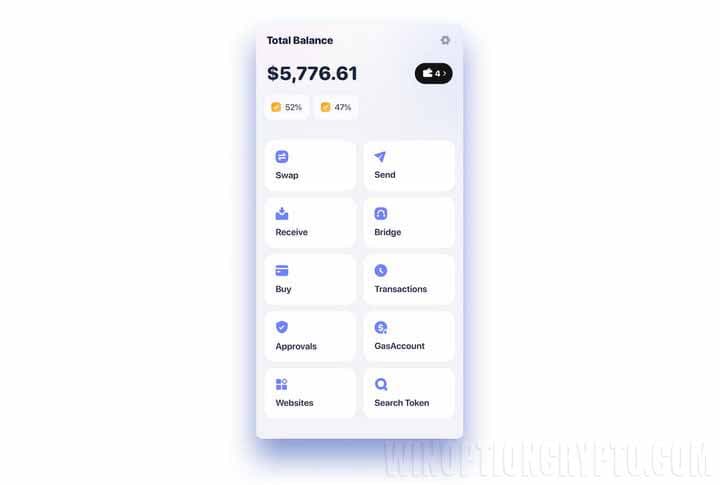
The wallet has a well-designed, multi-functional interface that is easy to use and pleasant to interact with.
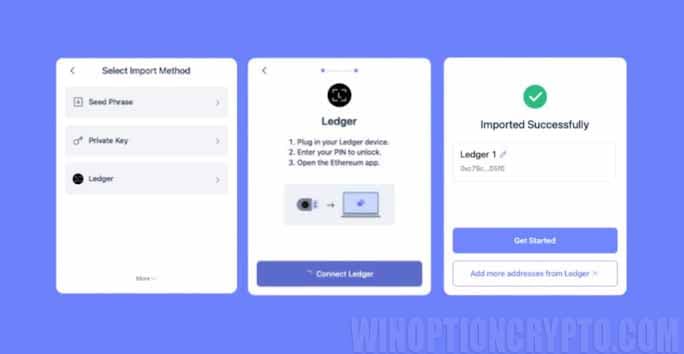
Rabby features full integration with Ledger and Trezor hardware devices.
Installing Rabby Wallet and Creating a Wallet
The Rabby wallet is available in several formats: as an extension for Chrome, Brave, and Edge browsers, a mobile app for iOS and Android, and desktop versions for Windows and macOS.
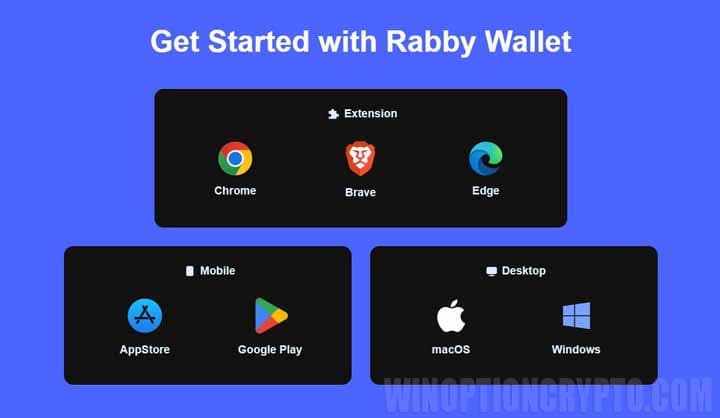
This way, you can access your wallet from any device and anywhere. After installing the app, all you need to do is create a new address or log in to an existing wallet.
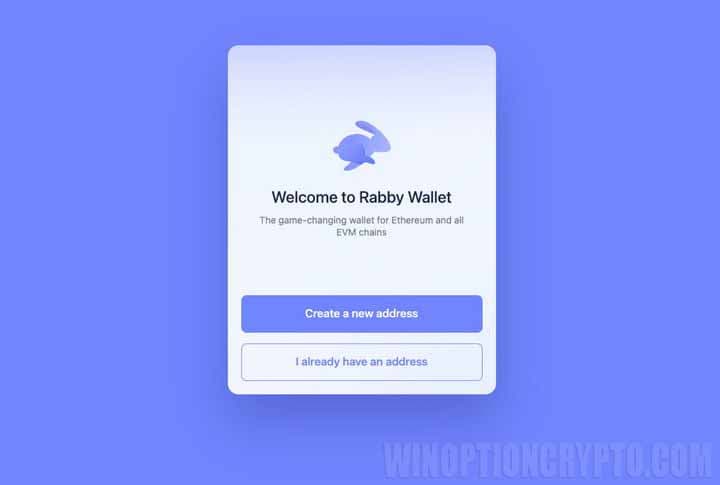
If you choose to log in to an existing wallet, you can use not only your seed phrase or private key, but also connect a Ledger hardware wallet or any other device that supports Rabby Wallet.
Let's say you need to create a new address. Click "Create a new address." The wallet will open a warning window: Rabbit Wallet doesn't store your passphrase, so if you lose it, you'll lose access to your funds.
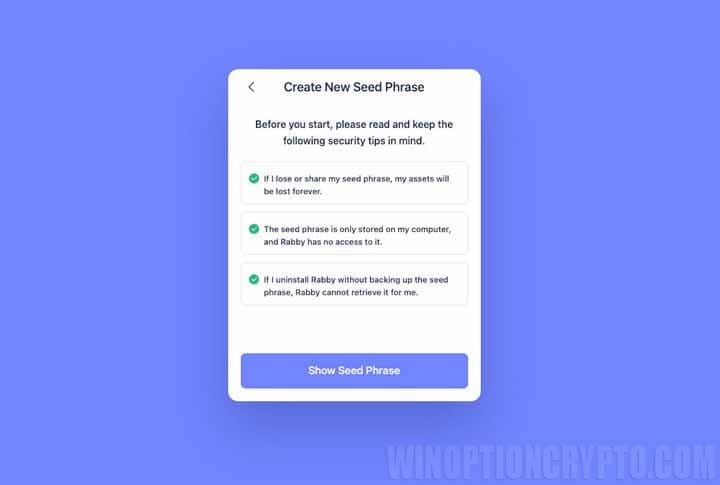
Please note: if you delete the Rabbit Wallet extension or the browser itself, you will not be able to restore access to your wallet without your seed phrase. Therefore, it is crucial to write it down and store it in a safe, inaccessible location.
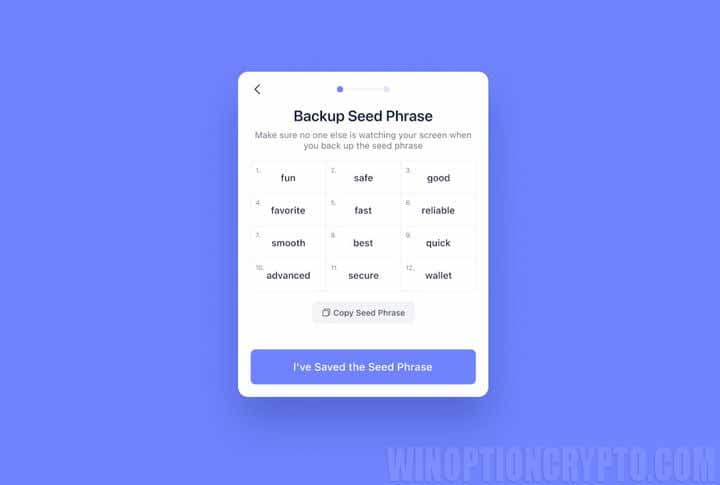
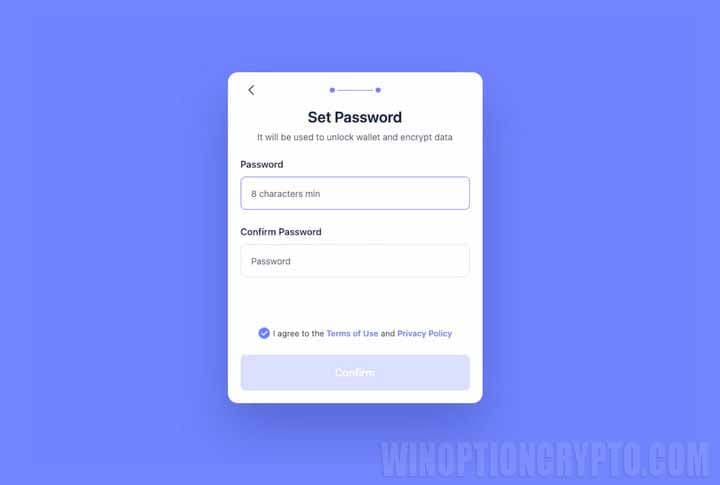
After saving the seed phrase, create a password of at least 8 characters and click the “Confirm” button.
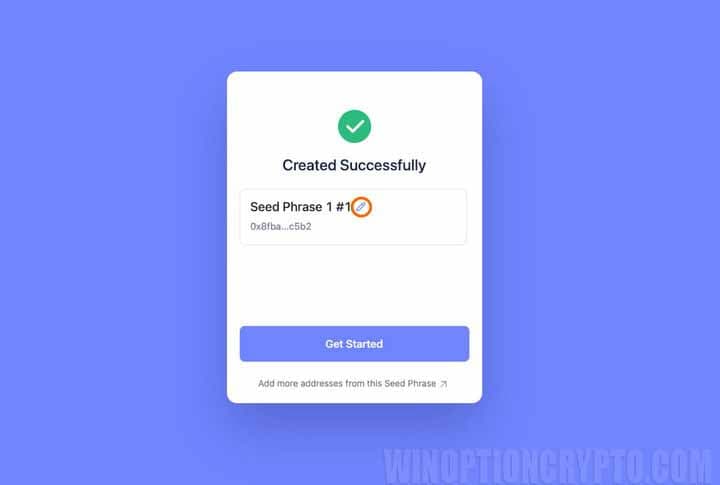
Once you create a password, your address will be successfully generated. If you wish, you can click the pencil icon and give it any name you like.
Setting Up a Wallet
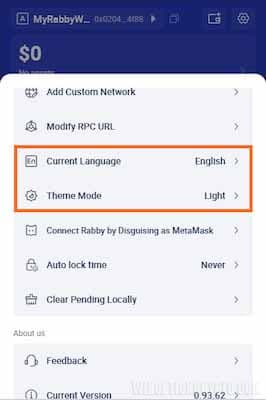
After logging into your wallet for the first time, you can customize its appearance and select a convenient interface language.
How to Add a New Token
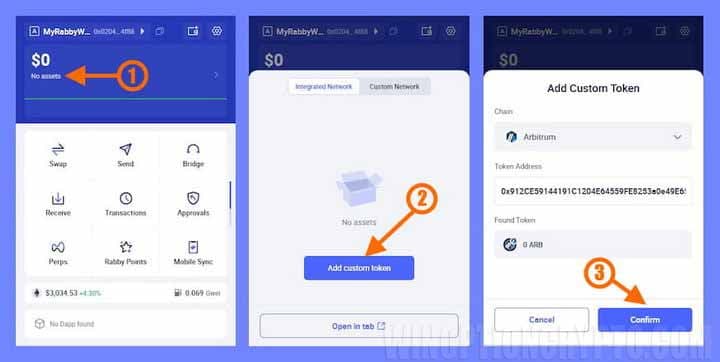
To add a new token, click on your wallet name, then open the "Assets" section. Then, select the desired network, enter the contract address, and click "Confirm."
How to Check the List of Websites and DApps Connected to Rabbit Wallet
To view a list of apps connected to your wallet, open the “Dapps” menu on the main Rabby Wallet panel.
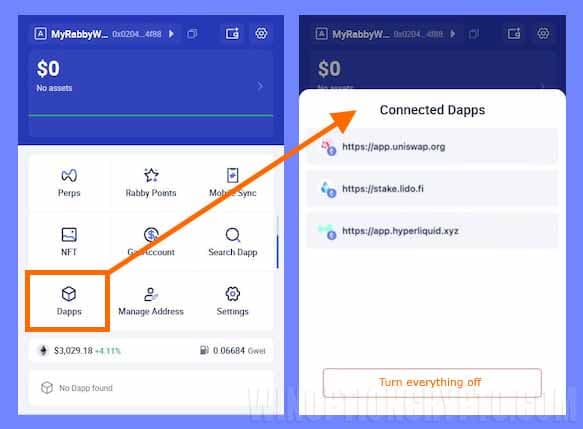
Essentially, this is a list of websites where you can log in using your wallet. This section also allows you to manage connections: disable individual apps or all at once, without visiting the websites themselves.
How to Top Up Rabbit Wallet
Topping up your Rabby Wallet cryptocurrency wallet is easy: click the "Receive" button and select the network you want to deposit funds to.
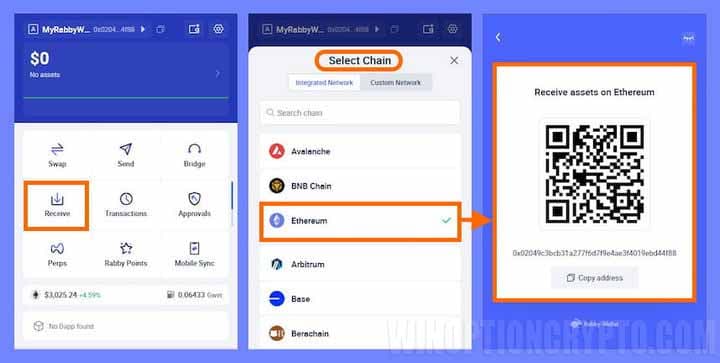
For example, to top up your Ethereum wallet, find the desired network in the list and click on its name. A page with a QR code address will open. Scan the code in the exchange's mobile app, enter the amount, and send the funds to your wallet. Before making any transfer, always check which network you're using.
Cryptocurrency Exchange in Rabby Wallet
There are several ways to exchange cryptocurrency in Rabby Wallet: through the built-in interface or through third-party trading platforms.
Built-in Exchange (Swap)
The wallet features a "Swap" function for exchanging cryptocurrencies. It allows you to quickly exchange one token for another directly within the Rabbit Wallet interface, without having to go to third-party platforms. It's important to remember that the wallet itself is not an exchange, but rather an aggregator.
This means that when you submit a trade request, Rabby automatically scans offers on multiple decentralized exchanges like Uniswap, Sushi Swap, 1inch, and others to offer you the best prices and minimal slippage.
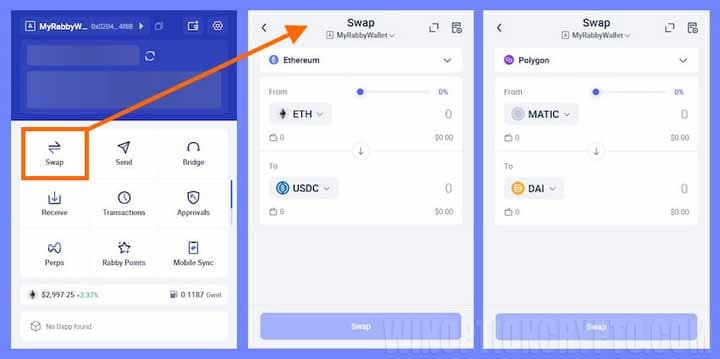
Since the Rabby wallet supports multiple networks, you can exchange tokens on any of them. For example, you can exchange ETH for USDC on the Ethereum network or MATIC for DAI on the Polygon network.
Exchange on Third-party Platforms
The built-in exchange is certainly very convenient. However, there are situations where wallet aggregators cannot meet specific user needs. For example, you might need a new or niche token whose liquidity is only available on a DEX not included in Rabby's list of aggregators, or you might need access to a specialized liquidity pool, such as Curve or Balancer.
In such cases, you can use external platforms for cross-chain exchanges, liquidity provision, or working with unique financial products and tokens.
Paying for Gas with Stablecoins: How Gas Account Works
By allowing you to pay for gas (the fee for using the blockchain network's computing power) with stablecoins, the Rabby wallet solves the problem of running out of gas when you don't have the native token to pay network fees. For example, you want to exchange a token on the Polygon network but don't have MATIC, but you have plenty of USDC. In this case, the Rabby wallet allows you to use USDC to pay the MATIC fee.
With this feature, you don't need to hold native tokens on each network: one Gas Account can be used to pay for gas on all networks.
To take advantage of this feature, top up your Gas Account and use it for any transactions. When signing transactions, you can choose to pay for gas using native tokens or your Gas Account balance. You can switch between these modes at any time. Rabby Wallet doesn't charge any additional fees: you only pay for the gas used in your transaction and a small fee for transferring it to your address.
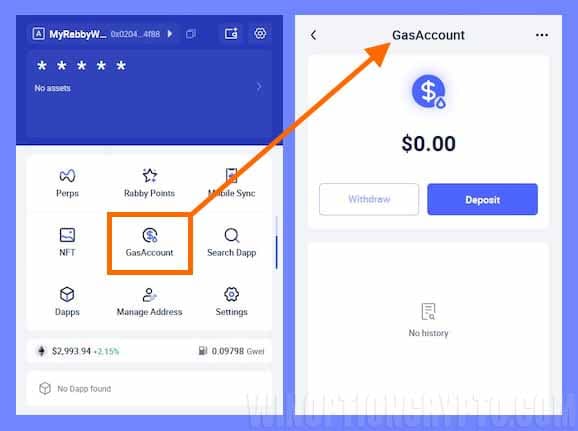
Using this account is very simple: you deposit gas into your Gas Account in the wallet, and Rabby automatically sends gas to your address when needed. It's completely secure.
Bridges in Rabbit Wallet
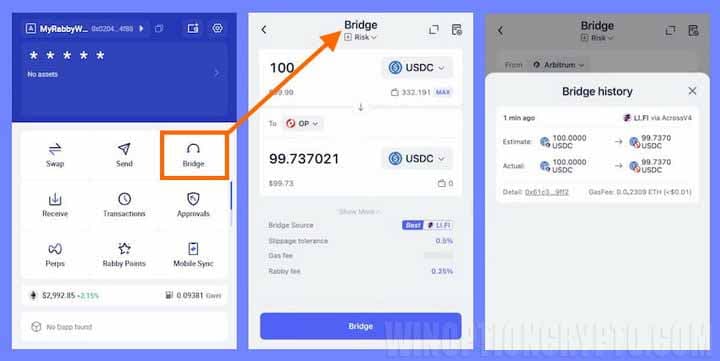
If you need to move assets between different blockchains, use the Bridge feature. Unlike Swap, which is designed for exchanging tokens within a single network, Bridge performs cross-chain transactions.
Please note that Rabby Wallet does not operate its own bridge. Instead, it acts as a bridge aggregator, leveraging the functionality of well-known third-party cross-chain protocols.
When you select a token and two networks (for example, you want to send USDC from Arbitrum to Optimism), Rabby begins scanning several leading cross-chain protocols and bridges to select the most optimal route. In our case, this is LI.FI. It's especially important to note that before signing the transfer, Rabby displays which assets and in what quantities will leave your wallet on the source network, significantly reducing the risk of interacting with dubious protocols.
How to Withdraw Funds from Rabbit Wallet
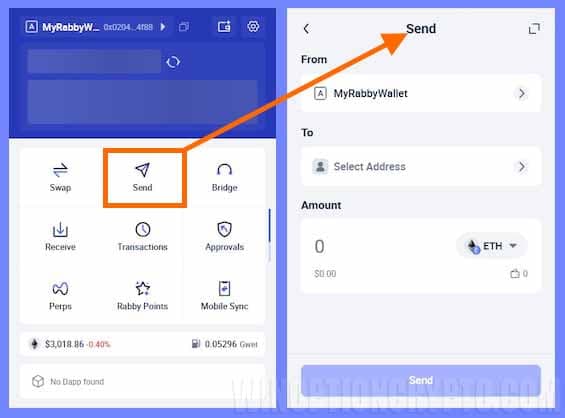
Withdrawing funds from your wallet is essentially sending assets from your address to another: for example, to a centralized exchange address, another personal wallet, or a recipient's address. Remember that Rabby is a non-custodial wallet, meaning all funds are under your personal control. Therefore, it's especially important to carefully check the address you intend to send them to.
Additionally, when preparing a transfer, make sure you have gas—the native coin of the network where the transfer will be made and the fee will be charged. For example, ETH for Ethereum or MATIC for Polygon. If you don't have the required coins, use the Gas Account feature.
Once you've verified everything, you can proceed to sending funds. To do this, open the Send menu and select the address, network, asset, and amount.
Frequently Asked Questions (FAQ)
How is Rabbit Wallet Fundamentally Different from MetaMask?
The main difference between Rabby and MetaMask is that this wallet can automatically switch to the desired blockchain during an exchange and uses transaction simulation, allowing users to see future balance changes before signing them. Additionally, the wallet warns about suspicious contracts and excessive permissions.
Does Rabby Support Hardware Wallets and is it Safe to Use?
Yes, Rabby Wallet provides convenient integration with leading hardware wallets like Ledger and Trezor. All private keys and seed phrases remain yours alone. The wallet enhances security by preventing fraudulent transactions and allows you to revoke permissions for old or unused smart contracts.
Do I Need to Add a Network or Token Manually?
In most cases, you won't need to add anything yourself, as the wallet does this automatically, supporting over 100 Ethereum-compatible networks. The exception is new and highly specialized tokens, which can be added manually by entering their smart contract address in the wallet's asset management menu.
What is a Gas Account and How Does it Help with Exchange?
Gas Account is one of Rabby's most important features, eliminating the problem of running out of funds to pay fees. Funds in this account allow you to use tokens in your wallet to pay the necessary fees for transfers or exchanges.
Is it Possible to Exchange Tokens Between Different Blockchains?
Yes, Rabby Wallet has a Bridge feature that allows you to move assets between different networks. The wallet has built-in third-party bridge aggregator functionality, allowing you to securely exchange assets between different blockchains using the fastest and cheapest route.
To leave a comment, you must register or log in to your account.