




The Pro Lizer MT4 binary options indicator is a signal tool that combines the simplicity of an arrow indicator with an advanced approach to trading on rebounds from dynamic channel boundaries. In our reviews, we typically focus on technical indicators that don't repaint. However, in this article, we'll make an exception and demonstrate how even a repainting indicator can generate profits in binary options trading.
Content:
- Characteristics
- Installation
- Overview and settings
- Pro Lizer MT4 Trading Rules
- Opening a Call Option
- Opening a Put Option
- Conclusion
Pro Lizer MT4 Binary Options Indicator Features
- Terminal: MetaTrader 4
- Timeframe: M5
- Expiration: 1 candle
- Option Types: Call/Put
- Indicators: Lizer Channel.ex4, Lizer Timer.ex4
- Trading instruments: currency pairs, commodities, cryptocurrencies, stocks
- Trading hours: 8:00-20:00 (GMT+2)
- Recommended brokers: Quotex, Pocket Option, Alpari, Binarium
Installing the Pro Lizer MT4 Binary Options Indicator
The Pro Lizer MT4 indicator is installed on the MetaTrader 4 platform as standard. To do this, add it to the terminal's root folder by selecting "File" in MetaTrader 4 and then "Open Data Folder." In the folder that opens, navigate to the "MQL4" folder, then "Indicators," and move all files there. Templates are installed in a similar manner, but placed in the "templates" folder. For more detailed installation instructions, watch our video:
Pro Lizer MT4 Binary Options Indicator Review and Settings
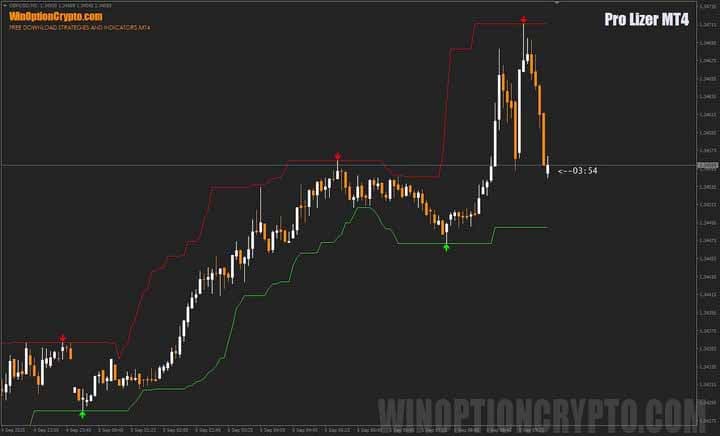
The Pro Lizer MT4 indicator consists of a channel that closely resembles Richard Donchian's famous invention. Its upper and lower boundaries represent dynamic support and resistance levels, from which trading signals are generated when the price bounces. It's impossible to confuse the direction of trades: signals to buy Call options are marked with green arrows, while signals to buy Put options are marked with red ones.
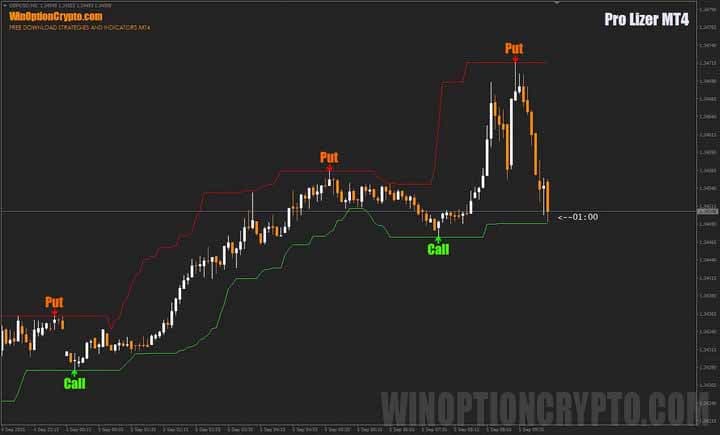
At first glance, everything seems simple and obvious: the trader needs to wait for an arrow to appear and open a trade in the corresponding direction. However, this isn't entirely true. Upon closer inspection of the channels, "steps" appearing as they update become visible.
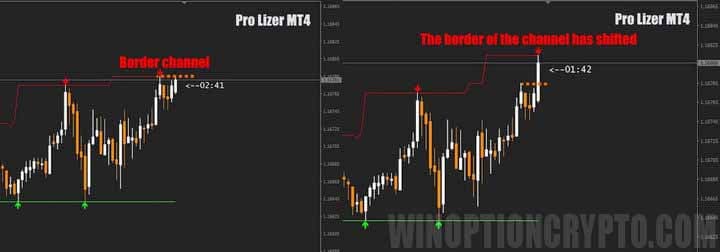
As you can see in the image above, an extreme formed and a red downward arrow appeared, signaling an opportune moment to open Put options. However, after some time, the price reached a new high, the upper boundary of the channel shifted upward, and the arrow signal disappeared — a classic repainting.
We could stop there, if not for one "but": despite the signal changing, the entry along the previous red arrow turned out to be profitable when buying Put options with a one-candle expiration. The fact is that if the price is poised to continue rising in line with the trend, a small pullback usually occurs before the breakout, which is sufficient to generate a profit on binary options.
To protect against such cases of stepwise increases or decreases in channel boundaries, you can use a simple rule: open trades based on arrow signals one candle after their appearance. This will eliminate most situations of price movement without a pullback, with the Pro Lizer MT4 indicator constantly updating its boundaries.
Now a few words about the settings of this indicator.
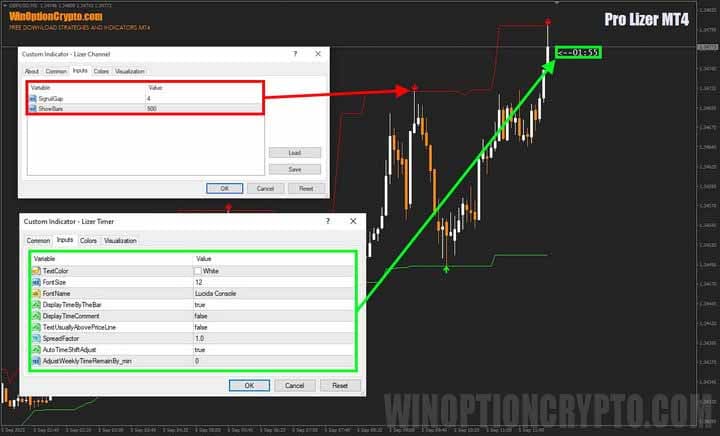
In the Pro Lizer MT4 settings, you can only configure the number of candles that form a fractal and the total number of bars for displaying signal arrows. The Lizer Timer indicator also has few parameters: you can choose the color, font, and location of the timer display.
Trading Rules for the Pro Lizer MT4 Binary Options Indicator
Despite some caveats, this indicator can be used in trading. To do so, simply follow a simple rule: don't open trades until the candle following the signal candle (the one on which the arrow appears) closes. In other words, after the arrow appears, wait for the fractal to fully form — a candlestick pattern where at least one candle on the left and right has extremes below (or above) the extreme of the central candle.
If you're interested in learning about other candlestick patterns besides fractals, we recommend checking out our selection of articles on this topic:
- Candlestick analysis and binary options.
- Japanese Candlesticks for Beginners and How to Read Them.
- Japanese candlesticks – graphical analysis.
- Using pin bars in binary options trading.
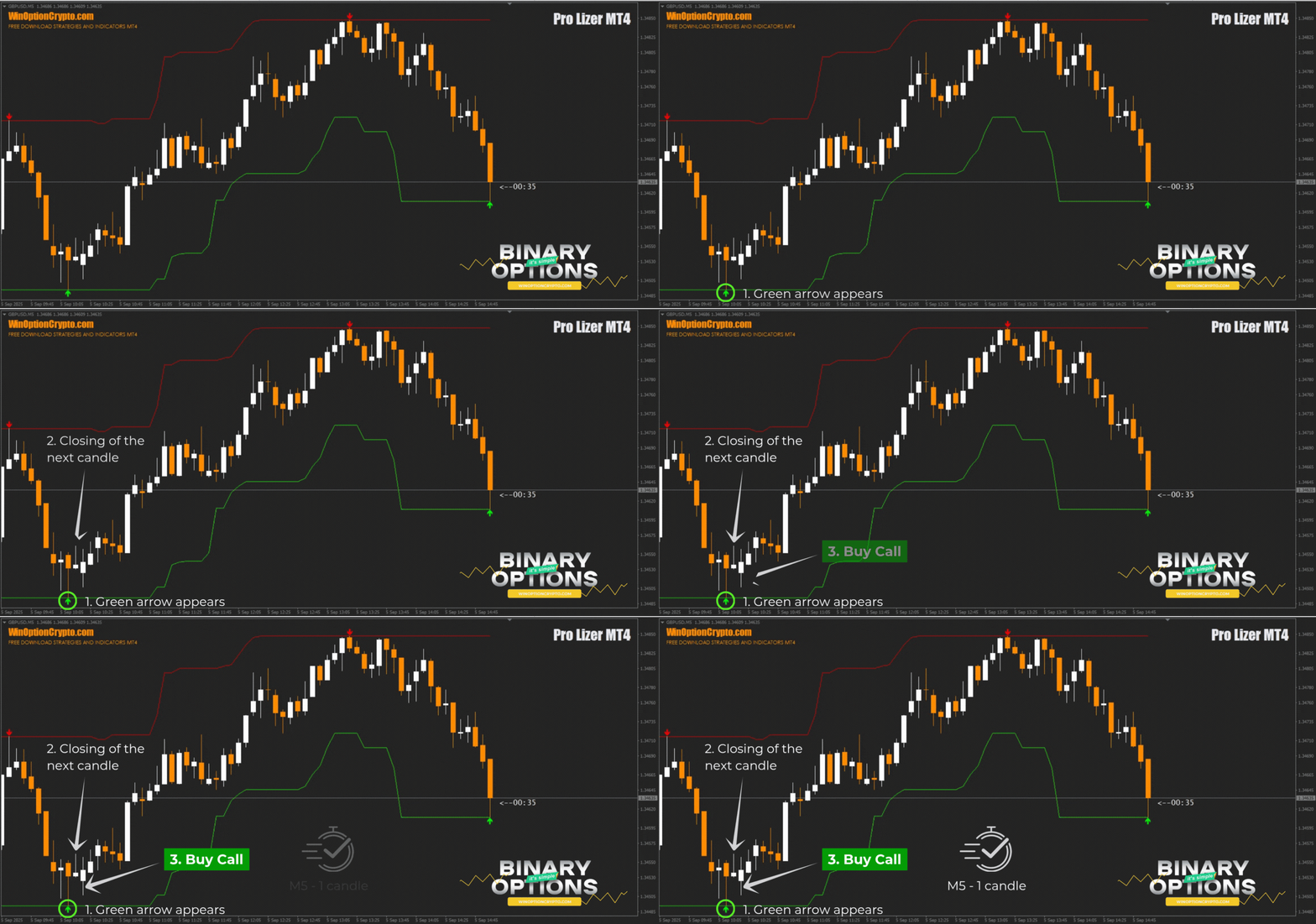
Opening a Call Option
- We wait for a green arrow to appear under the candle.
- We wait for the next candle to close completely.
- At the opening of the second candle after the arrow, we buy a Call option
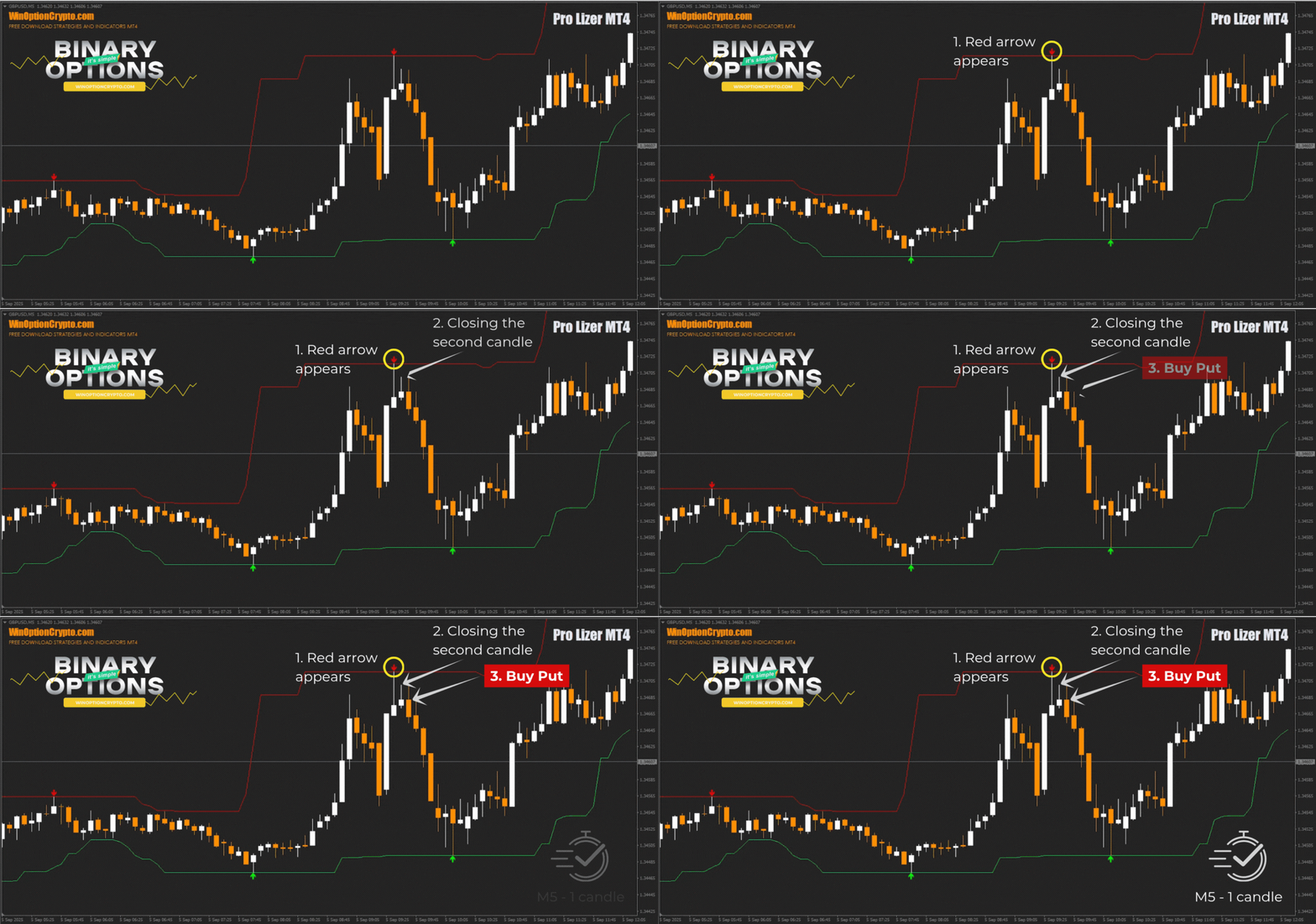
Opening a Put Option
- We wait for the red arrow to appear above the candle.
- We wait for the next candle to close completely.
- At the opening of the second candle after the arrow, we buy a Put option
We recommend setting the expiration time to one candle. However, the optimal holding period depends on the specific asset and should be determined by you based on historical data testing results. This approach will help tailor the strategy to the specifics of the chosen instrument and improve its effectiveness.
Specifics of Using the Pro Lizer MT4 Binary Options Indicator
This indicator is especially effective in flat markets, so it's recommended to select assets trading in a wide price range. However, avoid opening trades before the release of important macroeconomic data on the economic calendar, as the market typically moves steadily at such times, and trading with Pro Lizer MT4 signals risks a series of losing trades.
Pros of the Pro Lizer MT4 Indicator
The main advantage of this indicator is in trading false breakouts, which often pose a problem for traders who open positions based on breakouts. Considering that markets spend most of their time flat, this approach can be effective.
Cons of the Pro Lizer MT4 Indicator
The obvious drawbacks of this indicator include redrawing signals during price increases or decreases without a rebound. Traders must strictly follow the trading algorithm and carefully monitor the candlestick sequence after the arrows form.
Conclusion
The Pro Lizer MT4 binary options indicator isn't a reliable tool for beginners, and we can't recommend it to novice traders. However, experienced market participants can add this tool to their strategy arsenal. In flat markets, Pro Lizer MT4 generates fairly accurate signals and can be useful for binary options trading.
However, before using Pro Lizer MT4 with real funds, be sure to practice on a demo account with a reliable broker. Understand how the indicator works and strictly adhere to all rules, keeping risk and money management in mind. Happy trading!
Download the Pro Lizer MT4 Binary Options Indicator

To leave a comment, you must register or log in to your account.